Dosto aapne dekha hoga ki aajkal Indian Army ai photo editing prompt ka use karke banai gayi photo Instagram, Facebook jaise social media par share ki ja rahi hain. Ab bahut se log Indian Army style Ai photo banana chahte hain. Jisme wah Indian Army ki dress me me anokha aur unique dikhe. Aap ChatGPT jaise ai tool ka upyog karke apna professional Indian Army ai photo banane ki kosis kar sakte hai.
Indian Army theme wali photo mein vishwas, sahas aur deshbhakti jaise elements ko dikhaya ja sakta hai. Isi theme ko dhyan me rakh kar humne is post mein kuchh ai photo editing prompts share kiye hain.
Indian Army ai photo editing prompt ka details
Es post mein Indian Army theme par ai photo banane ke liye kuchh prompts diye gaye hain. Har prompt ka apna alag look hai. Esme bas apni ek photo upload kare aur prompt paste kare ab Ai image generator Indian Army theme me photo banane ki kosis karega.
Indian Army theme me bettar result pane ke liye kya karein?
Agar aap Indian Army theme par photo bana rae hai aur aapko better result chahiye to niche diye gaye bato ko dhyan me rakhe.
- Reference photo better quality ka upload karein.
- Photo samne se click kiya gya hona chahiye.
- Chehara ka bhaw sahi hona chahiye.
- Photo me natural light honi chahiye.
Agar aapki photo me ye sabhi element hai to ChatGPT aapke photo ko kuchh better banane ki kosis karega.
Indian Army Ai Prompt
Photo me ek boy puri tarah se Indian Army wala dress pahana hai. Uske pichhe dur pahado par ek indian flag dikhai de raha hai photo ka pura look sundar lag raha hai.
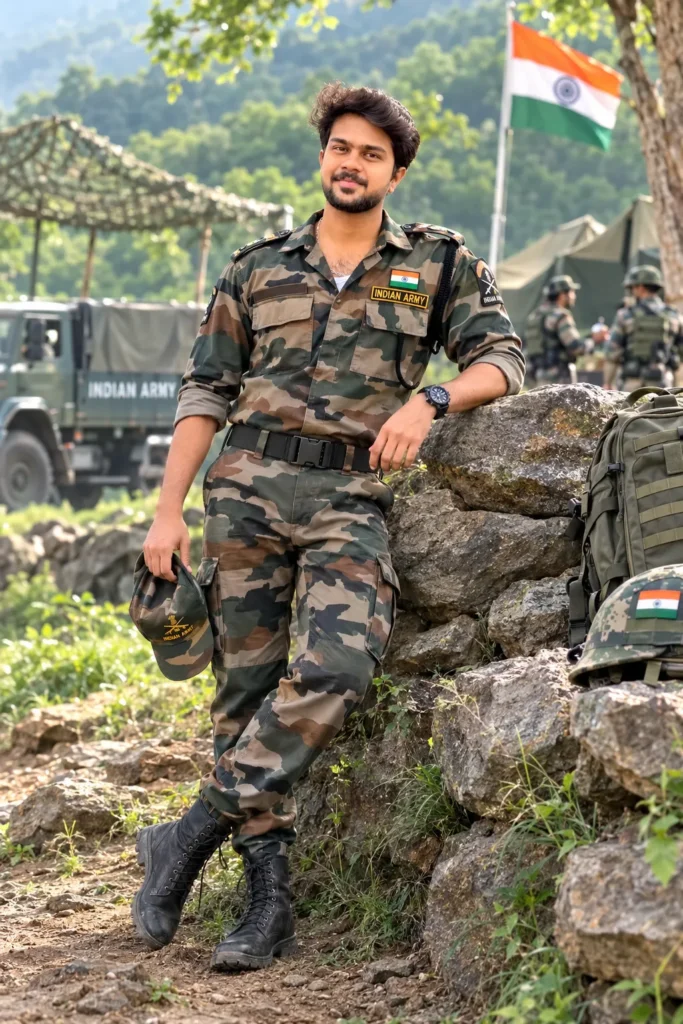
Ultra-realistic Indian Army soldier standing confidently outdoors in a natural military environment, wearing authentic-looking Indian Army combat uniform, tactical boots and cap, strong but natural expression, realistic skin texture and body proportions. Green forest and rugged terrain in the background, soft morning sunlight, natural shadows, cinematic depth of field, DSLR photography, 85mm lens, sharp details, realistic colors, 8K photorealistic quality. No cartoon, no anime, no CGI, no artificial face.
Indian Army With Flag
Es photo me Indian Army hath me flag liya hai aur wo puri confidence ke sath khada hai photo ka pura look deshbhakti ko dikha raha hai
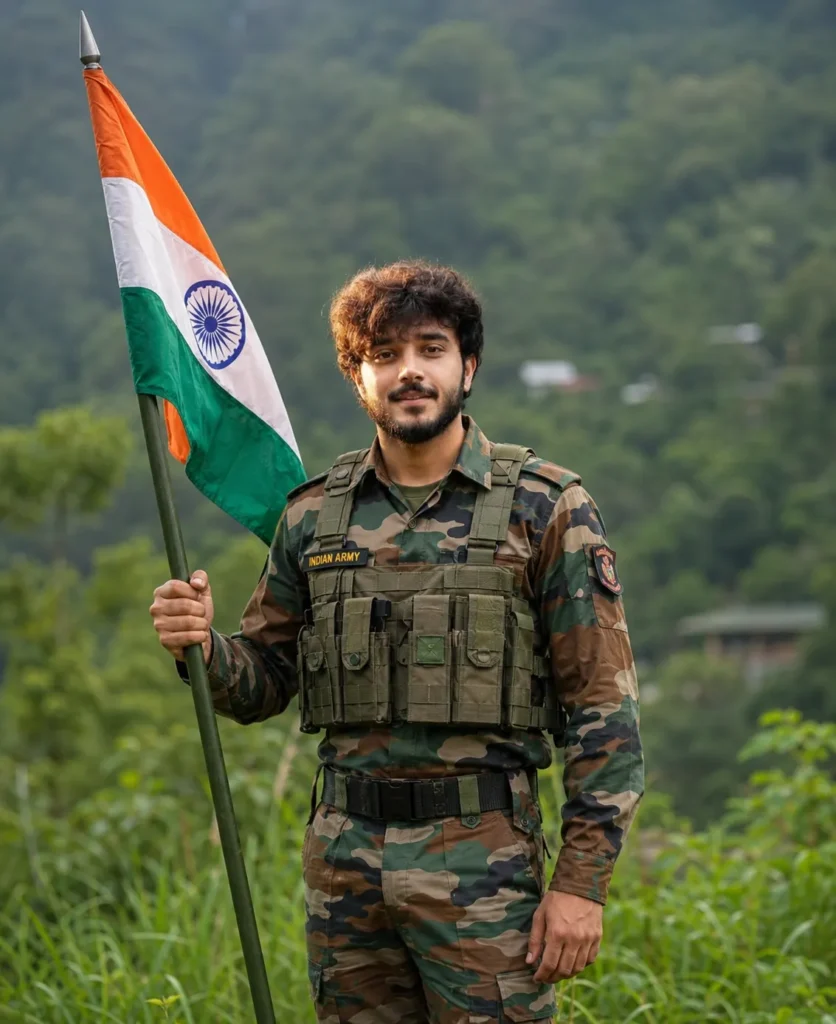
Ultra-realistic Indian Army soldier standing proudly outdoors in a lush green field, wearing an authentic-looking Indian Army uniform and holding the Indian national flag (Tiranga) respectfully in his hand. Natural confident expression, realistic skin texture, detailed uniform, green trees and open landscape in the background, soft morning sunlight, natural shadows, cinematic depth of field, DSLR photography, 85mm lens, true-to-life colors, 8K photorealistic quality. No cartoon, no anime, no CGI, no artificial look.
Indian Army ai photo editing prompt me kuchh powerfull keyword ke matalab :
Jab bhi aap kisi prompt ka upyog karke ai photo banate hai, to prompt dekhne par aapke man me ek question jarur aata hoga ki usme likhe gaye keyword ka matlab kya hota hai. Jaise – Ultra realistic, 8k kya hai, RAW, Dslr Close-up aur portrait jaise keyword ka kya matalab hai to tensan na le. Ham aapko ai prompt ke sabhi powerfull keyword ke bare me batayenge ki kaun keyword kya kaam ata hai.
- Ultra-realistic – Eska matalab hai ki ai image ko real photograph jaise appearance dene ki koshish karta hai, jisme skin, dress aur light setup ko natural dikh sakte hai.
- 8k – Ye high quality output ko indicate karta hai. Actual image resolution ai tool capabilities par depend karta hain.
- RAW – RAW ka matalab ki pboto bilkul natural honi chahiye. Color, light sab kuchh natural honi chahiye.
- DSLR – Dslr Keyword ai ko yah batata hai photo es tarah se dikhni chahiye jaise ki photo banai nahi balki Dslr se click kiya gya hai.
- Name “Prince Ram” – Eska matalab hai ki dress par “Prince Ram” name likha hona chahiye.
- Aspect ratio – Yah photo ki size batata hai ki photo kis size me chahiye.
ChatGPT me Indian Army ai photo kaise banaye?
Agar Indian Army theme par ai photo banana chahte hain, to is post me diye gaye prompt ka upyog kar sakte hain aur niche diye gaye steps ki madad se aap image generate karne ki process ko follow kar sakte hain.
- Sabse pahale upar diye gaye prompt me se apne pasnd ka prompt chune aur copy button par tap karke copy kar le.
- Ab “Create Image” button par tap kare ya ChatGPT ka app ya official website open karein.
- Ab (+) icon par click kare aur apni ek clear reference photo upload karein.
- Ab copy kiye gaye prompt ko paste kare aur yadi aap prompt me name, location ya koi bhi element badalna chahte hai hai to badal kar send karein.
- Ab photo generate hone ka intezar karein, image generate hone ke baad save kar sakte hain.
Final
Indian Army AI prompts ka use karke aap deshbhakti theme par creative aur realistic-looking AI images generate kar sakte hain. Upar diye gaye prompts se aap apni reference photo, background, outfit aur anya details ke according customize kar sakte hain. Behtar result ke liye clear reference photo upload karein aur detailed instructions ka use karein.