Aaj Independence day ke awasar par ham apke liye 15 August ai photo editing prompt lekar aye hai. En prompt ki madad se aap 15 August ki ai photo bana sakte hai.
Es ai photo me sabse badi baat yah hai ki apka chehara sahi se banane ki koshish karta hai. Apko bas niche diye gaye kisi bhi prompt ko copy karna hai, aur Chatgpt me reference photo ke sath paste kar dena hai.
Es prompt ki madad se aap apni pasnd ke anusar 15 August ki alag alag style ki ai photo bana sakte hai. Ye sabhi prompt bahut hi creative ai photo banane ke liye design kiya gaya hai.
15 August ai photo editing ka details
Dosto ham sam jante hai ki 15 August ab kuchh hi dino baad ane wala hai. Hr saar pure Bharat me es din ko bade dhum dham se manaya jata hai. Es din par log ai desh bhakti ki ai se banai gayi photo social media par share karte hai. Lekin aajkal log purani style me banai gayi photo share kar rahe hai. Jo dikhane me bahut puarana lagta hai.
Es baat ko dekhte huye aaj ham apke liye 15 August ki kuchh unique ai prompt lekar aye hai. En prompt ki madad se aap realistic-looking ai photo bana sakte hai. Jo dikhane me stylish lagte hai.
Agar aap in prompt ko try karte hai to aapki photo bhi 15 august theme par ban jayegi. Log apse puchhenge ki tumne yah photo kaise banai hai. Agar aap 15 August par kuchh naya ai photo banana chahate hai, to en prompt ka upyog kar sakte hain.
15 August ai photo editing Prompt kya hai?
15 August ai photo editing prompt ek prakar ka text code hai, jiski madad se Chatgpt, Google Gemini, ya koi aur ai tool independence day ki ai photo taiyar kar sakta hai. Photo banane ki elements es prompt me likhi hogi hai. Jaise ki – color, india gate, indian army, deshbhakti ka mahaul, light. Ai isi elements ke according ai photo taiyar kar sakta hai
Aaj kal kuch log apni normal photo ko independence day ki ai photo me badal rahe hai. Aur instagram, facebook jaise social media par share kar rahe hai. Yadi aap ai photo banane ke liye sahi tarah se prompt likhe ho to ai tool ko samjhane aur photo generate kaarnee mein madad mil sakti hai. Esliye ai photo banane ke liye yeasa prompt chune jisme camera angle, background, kapada, light setup ke bare me likha gaya ho.
Agar aap social media ke liye creative content banana chahate hai, to 15 august ai photo editing prompt aapke liye upyogi sakta hai. Sahi prompt se aap bina kisi prakar ke editing sikhe creative aur better ai photo bana sakte hai. Yahi wajah hai ki har saal independence day nazdik aate hi 15 August ai photo editing prompt search hone lata hai.
Tiranga ke sath portrait
Ek ladka apne sarir par tiranga color ka kapda rakha hai. Aur atmvishwas ke sath khada hai. Background pura black hai. Jisase photo jyada realistic aur sundar lag rahi hai.
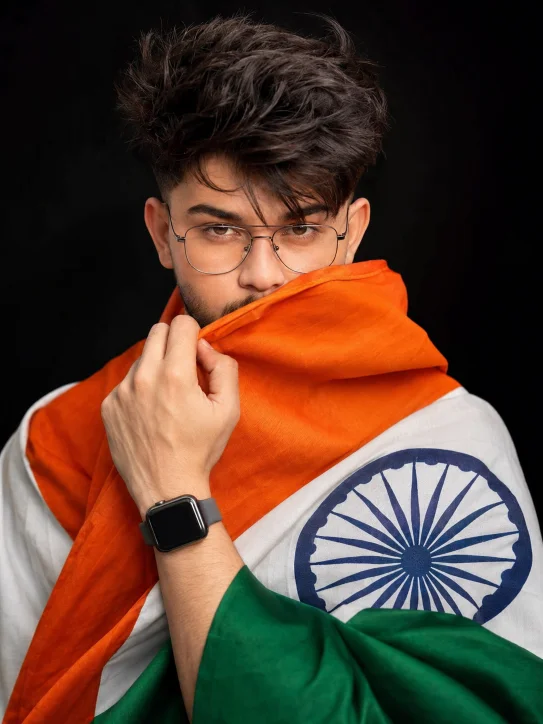
8K ultra-realistic portrait. Young Indian man (face same as reference), well-groomed beard, stylish brown hair, wrapped in Indian flag. Wearing smartwatch, glasses; orange fabric partially covers face, adding mystery and patriotism. Sharp focus on eyes, dark black background, emotional, photorealistic, ultra-detailed.
Jai hind, Jai Bharat
Es ai photo me background puri tarah se black hai aur thoda bahut dhuye ka effect hai. Ek ladka apne sarir par tiranga odhe huye pure josh ke sath khada hai side me jai hind jai bharat likha hai. Jisase photo bahut hi sundar lag rahi hai.
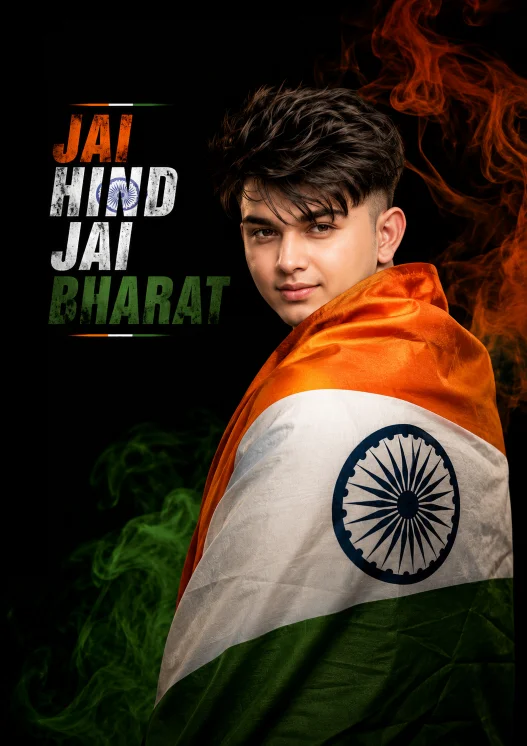
Striking studio portrait. Young Indian man (face same as reference) wrapped in Indian tricolor, facing slightly back, warm confident smile. Deep black background, bold text “JAI HIND JAI BHARAT” in saffron-white-green with flag textures. Orange and green smoke trails. Cinematic lighting, minimal composition, patriotic vibe.
Chatgpt me 15 August ai photo kaise banaye?
Chatgpt me sahi prompt ka upyog karke koi bhi ai photo bana sakte hai. Bas niche diye gaye step ko dhya se padhe aur apna photo banaye.
- Prompt choose karein – sabse pahale 15 August ai photo editing prompt me se apne pasnd ka prompt choose karein aur copy karein.
- Chatgpt open karein – ab apne mobile ya computer me Chatgpt ka app ya official website open karein.
- Photo upload karein– ab + icon par tap karke apni photo upload kare.
- Prompt paste karein – ab copy kiye gaye prompt ko text box mein paste kare aur send button par click karein.
- Prompt edit karein – agar apke pasand ke according photo generate nahi hui hai to prompt me zaroori changes karein aur use dobara send karein.
- Photo save karein – ab jab apke pasand ka photo generate ho jaye, to save kar lein.
Final
15 august ai photo banane ke liye ye prompt useful ho sakta hai. Agar aap bhi deshbhakti theme par realistic photo banana chahate hain, to in prompts ko try kar sakte hain. In prompts me aap apni zarurat ke according prompt mein backgraaund, outfit, pose aur lighs jaise details ko bhi customize kar sakte hain.