Cute baby birthday Ai photo editing prompt ki madad se aap cute baby ka birthday khas aur yadgar bana sakte hai. Isme sirf 2 se 5 saal tak baby ke liye prompt diya gya hai. Jo hasi, masumiyat, aur chanchal se bharpur hai. Aur in palo ko khubsurti se safe kiya ja sakta hai.
In birthday Ai prompt ka use karke aap ChatGPT ya kisi dusare Ai tools mein bachchon ke liye birthday-themed image create kar sakte hain. Is birthday AI prompt mein Different birthday setup, outfit, cake, balloons diya gaya hain.
Cute birthday kids Ai photo editing prompts ka details
Dosto is Ai photo editing ki madad se aap aapne baby ke birthday ke liye unique aur real dikhane wali ai photo bana sakte hai. Yah prompt birthday theme par adharit hai. Is birthday ai photo me upload kiya gya reference photo ka face ai sahi se match karne ki koshish karta hain. Face par padne wali chamkdar light photo ko aur bhi khas bana deti hai.
Birthday day Ai photo banane ke liye aapko kisi tarah ka editing software skills ki jarurat nahi hai. Bas aap apni clear reference photo upload kare aur detailed prompt use kare, Ai image generator aapka photo banane ki koshish karna suru kar dega.
Birthday Ai photo banane ke liye kis tarah ki photo upload ki jati hai?
Kisi cute baby ka birthday Ai photo ya kisi bhi tarah ka Ai photo banane ke liye aapko clear reference photo upload karni chahiye. reference photo jitna clear hoga, Ai tool ke liye facil features aur overall appearance ko samjhna utna aasaan ho sakta hain.
Happy birthday baby boy Ai prompt
Is photo me ek chhota ladka khada hai uske samne table par ek bahut hi sundar cake rakha gya hai. Diwar aur aas pas ki jagah balloons se decorate kiya gya hain.
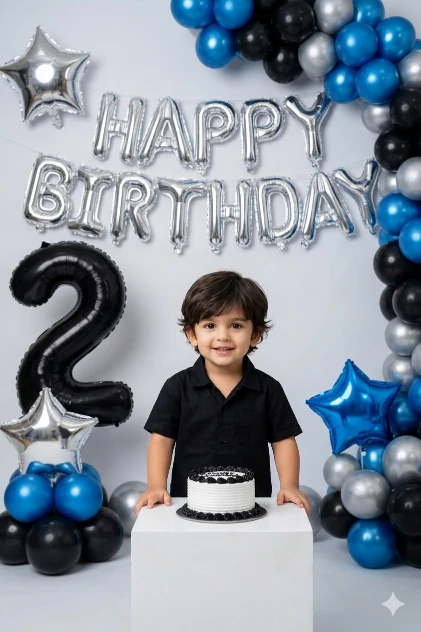
Maintain exact identity from uploaded photo. Do not beautify, regenerate, enhance, or modify the face in any way. Keep all facial details perfectly intact.I am uploading a photo. Use the uploaded image as the face reference and keep the face 100% exactly the same. Do not change facial features, skin tone, hairstyle, face shape, or expression. Strictly preserve the original identity without any modification.
Create a realistic 2nd birthday photoshoot of a baby boy standing behind a small white cube table with a small black and white birthday cake placed on top.
Background should have silver foil balloon letters saying “HAPPY BIRTHDAY”. Add blue, black, and silver balloon decorations arranged on both sides. Include a large black number “2” foil balloon on the left side and star-shaped foil balloons in silver and blue.
The baby boy should wear a stylish black shirt and look naturally happy.
Use professional studio lighting, DSLR quality, ultra realistic skin texture, sharp focus, shallow depth of field, natural color grading.
No cartoon, no illustration, no painting. Only photorealistic birthday photography.
Baby girl birthday Ai prompt
Is photo me ek chhoti bachhi queen jaise lag rahi hai. Uske samne table par cake rakha gya hai diwar ko black color ke balloons se decorate kiya gya hai.
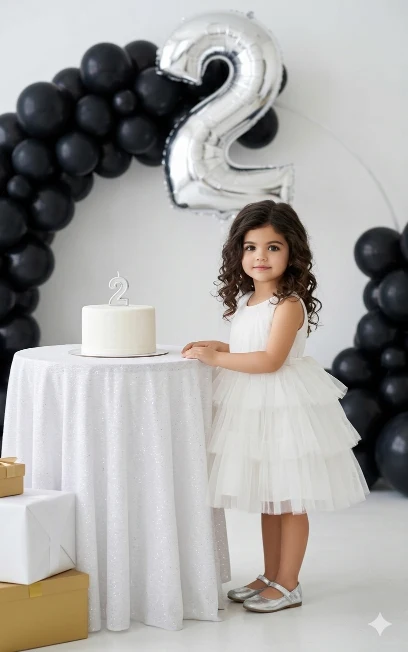
I am uploading a photo. Use this uploaded image as the face reference and keep the face 100% exactly the same. Do not change facial features, skin tone, hairstyle, or expression. Strictly preserve the uploaded face without any modification.
Create a realistic 2nd birthday photoshoot of a baby girl standing beside a small round table covered with a white glitter cloth. On the table place a simple white cake with a number “2” candle on top.
The baby girl is wearing a beautiful white frock dress with soft tulle layers and shiny silver shoes.
Background should have a clean white studio wall decorated with black balloon arch and a large silver number “2” foil balloon above. Add a few elegant gift boxes in white and gold colors near the table.
Use soft natural studio lighting, DSLR quality, sharp focus, ultra realistic skin texture, shallow depth of field, professional photography style.
No cartoon, no illustration, no painting. Only photorealistic image
Cute baby birthday Ai prompt kya hai?
Cute baby birthday Ai photo editing prompt ek prakar ka text command hai. Iski madad se ChatGPT, Google Gemini jaise Ai tool me baby ka birthday Ai photo banane ki kosis ki ja sakti hai. In prompt me baby ka age, outfit, birthday decoration jaise sabhi jankari di gayi hai. Ai image generator isi command ko dekh kar iske adhar par photo banane ki koshish karta hain.
Aise Ai-generated birthday images ko instagram facebook ya kisi dusare social media account par share kiya ja sakta hain. Is photo ko birthday yadgar ke roop me bhi save kar ke rakha ja sakta hain.
Agar aap Google Gemini ya ChatGPT jaise ai tool ka upyog karke birthday ko khas banana chaahte hain to, to prompt me outfit, pose, camera angle, style, aur quality jaise jankari bhi likhe. Isase Ai image generator photo ko sahi dhag se banane ki koshish karta hain.
ChatGPT me baby birthday Ai photo kaise banaye?
Agar aap bhi aapne baby ka birthday ko khas banana chahte hai, to is post me diya gya prompt ka use karke baby birthday Ai photo bana sakte hain.
- Prompt choose karein, aur copy karein.
- ChatGPT ya compatible Ai image tool open karein.
- Baby ki clear reference photo upload karein.
- Copied prompt ko paste karein aur apne jarurat ke hisab se edit karein
- Ab send button par tap karein aur Ai ko image generate karne de
- Ab result milne ke baad save karein.
Final
Baby Birthday AI Prompts ka use karke aap bachchon ke birthday ke liye different type ke creative images generate kar sakte hain. Upar diye gaye prompts mein birthday cake, balloons, outfits, background aur studio lighting jaise elements include hain. Aap in prompts me baby ki age, dress, birthday theme aur apni pasand ke according kuchh bhi customize kar sakte hain. Ek baat aur behtar result paane ke liye clear reference photo aur detailed instructions ka use karein.